
Overview
Our integration with Uniconta is a complete two-way integration based on Sales Orders or Projects in Uniconta. It is also integrated with inventory and the handling of inventory contents.
| Important! You cannot use both Sales Orders and Projects for the same company. One must be selected. |
Sales Order mode - overview
In this mode, Sales Orders in Uniconta are used for registrations and invoicing.
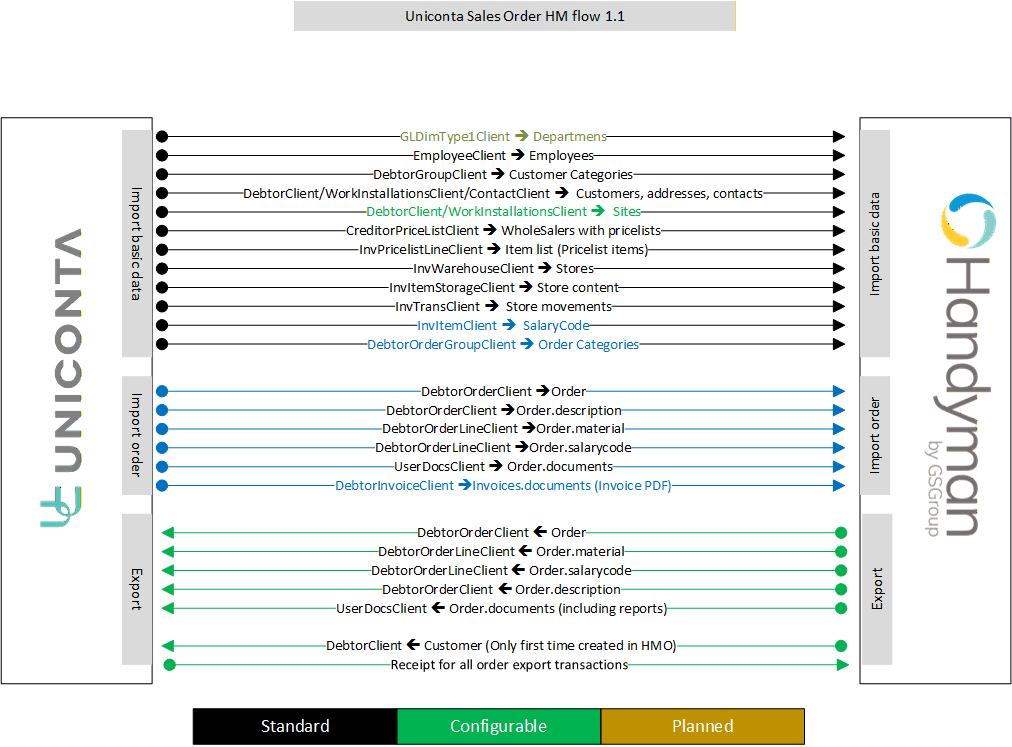 |
Project mode - overview
Here, Projects are used as the recipient of registrations in Handyman.
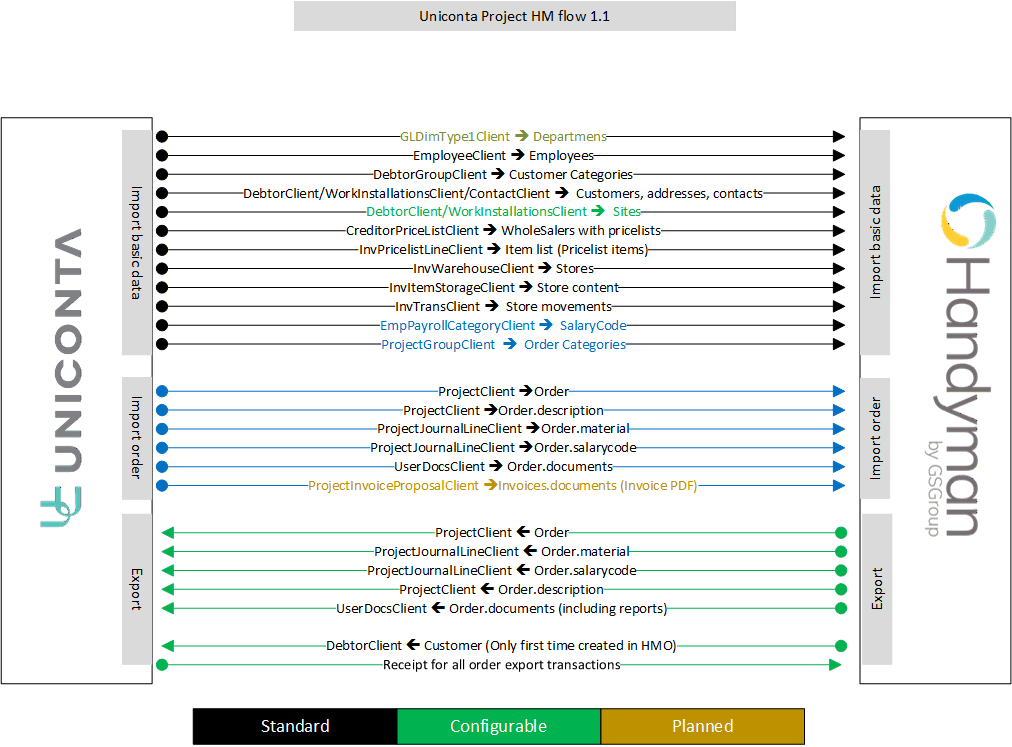 |
Overview of the master data transferred from Uniconta
Uniconta is the master for many elements, and these are automatically transferred to Handyman when they are changed.
There are some prerequisites for transfers that affect how different elements are configured in Uniconta. The table below shows what is required for each element.
Master data common to both modes
| Element | Source / API name | Configuration | Comment |
|---|---|---|---|
| Department | Dimensions | Select which dimension is used as the department | Blocked dimensions are not imported |
| Employees | Employees | Only employees linked to a Dimension are transferred | |
| Customer category | Customer category | A blocked category is deleted in Handyman | |
| Customers | Customers |
If blocked in Uniconta, the customer is deleted. When the block is removed, the customer is activated again. |
|
| Installation sites | Customer addresses | createSiteFromDeliveryLocation | Option in the integration |
| Suppliers | Suppliers with price lists | CreditorClient.Pricelist not null | Only imports suppliers with a price list in Uniconta |
| Price lists | Supplier price list | Updates are transferred every night | Cost price comes from the product |
| Item group for suppliers and products | Item groups |
createItemGroupForSuppliers Do not import groups that are not set to "Default" |
Creates item groups linked to the price list. Can be used to have supplier-specific prices in a contract. |
| Inventory | Inventory |
Only includes inventory of the following types: PickingLocation TransitWarehouse |
TransitWareHouse is intended for use with Material accounting in Handyman IgnoreWholesaler = true |
| Inventory contents | Inventory items | Transferred every night |
Master data dependent on the mode
Sales Order
| Element | Source / API name | Configuration | Comment |
|---|---|---|---|
| Order category | Order category | ||
| Pay type | Product | Dependent on the unit of the product |
Project
| Element | Source | Configuration | Comment |
|---|---|---|---|
| Order category | Project category | ||
| Pay type | Pay types |
Order information transferred between Handyman and Uniconta
Depending on the mode, order data to and from Handyman is sent to different locations in Uniconta. Important elements that are synchronized are shown below.
Sales Order - Import and export
New and changed orders are imported from Uniconta, and new and changed orders are exported from Handyman.
| Element | Connection | Comment |
|---|---|---|
| Caseworker | Approver | |
| Planned start | Delivery date | |
| Planned end | Due date | |
| Department | Dimension (1-5) | |
| Invoice customer | Invoice account | |
| Order descriptions | Comments | Uniconta has only one text field for the description. Additional descriptions can be added in Handyman. These are combined in the Handyman invoice text when the order is approved in Handyman. |
Updating inventory status based on material registrations on an order
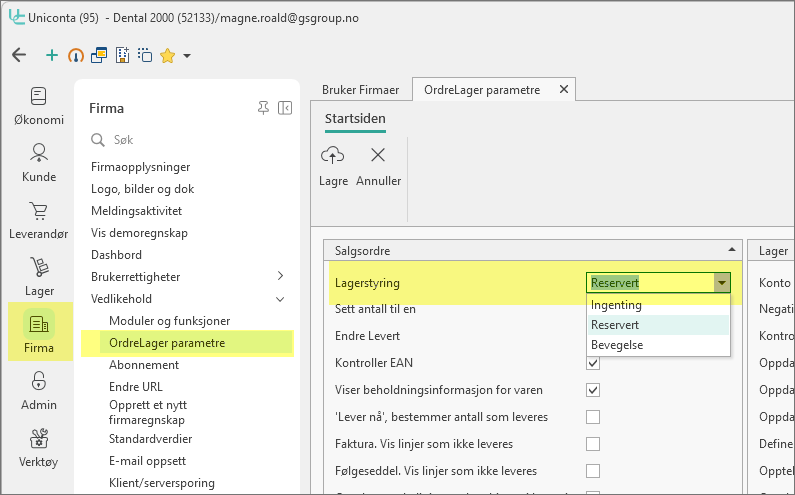
When inventory is used, all material registrations are linked to inventory, and the inventory level is updated automatically when the order data is updated in Uniconta. In Uniconta, you can choose whether inventory should be updated immediately or whether the material should be reserved in inventory until the order is invoiced.
This is selected here:
New customers created in Handyman
If an order has a new customer, the customer is automatically created in Uniconta when the order is exported for the first time.
Project - Export
(More information coming)
Inventory count from Handyman
An inventory count performed in Handyman Mobile is automatically sent to Uniconta when it is approved in Handyman. There is a setting for each inventory location that determines whether it is sent automatically or must first be approved in Handyman.
Inventory movements from Handyman
Moving items between inventory locations in Handyman Office or on Handyman Mobile is automatically sent to Uniconta so that the inventory status is updated as quickly as possible.
Configuration options in the integration
Depending on how Uniconta and Handyman are used, you can make some selections in the integration so that the selected working method in both systems fits as well as possible.
Sales Order - mode
| Setting | Explanation |
|---|---|
Import - settings | |
| Department Dimension | Connection to the department in Uniconta (1-5) |
| Create Item Groups For Suppliers | Creates item groups for suppliers so that special prices can be used for customers and related contracts |
| Create Site From Delivery Location | Automatically creates installation sites based on the customer's addresses. For customers who use the service module in Handyman |
| Add New Employees To All Trade And Salary Groups | New employees are automatically added to all trade groups and pay type groups |
| HoursType1Texts (Overtime) HoursType2Texts (Vacation) HoursType3Texts (Illness) HoursType4Texts (Supplement) HoursType5Texts (Quantity) HoursType6Texts (Other absence) |
Texts used to set the correct hour type for pay types in handyman. The unit is used first, and these texts can be used to specify what constitutes vacation, overtime, etc. |
| Default Product Unit | Default unit for products that are missing a unit in Uniconta |
| Set To Free If No Participant | New orders from Uniconta are set to available if no participant is specified |
| Execute Import On Timer | Imports price lists every night |
| Execute Store Items Import On Timer | Imports inventory levels every night |
Export settings | |
| Delete Order After Invocing | Deletes the sales order after automatic invoicing |
| Delete Orderline Invoiced | Deletes invoiced order lines after invoicing |
| Automatic Invoice Creation | Automatically creates an invoice when the order is completed and approved in Handyman |
| Export Documents | Exports order documents to the project in Uniconta |
| Reports To Export | List of reports from Handyman that should automatically be transferred when the order is completed |
| Export Store Movements | Exports manual inventory changes from Mobile/Office |
Project - mode
| Setting | Explanation | ||||
|---|---|---|---|---|---|
Import settings | |||||
| Department Dimension | Connection to the department in Uniconta (1-5) | ||||
| Add New Employees To All Trade And Salary Groups | New employees are automatically added to all trade groups and pay type groups | ||||
| Dont Map Hours Type For Salary Codes | If units are not used in the standard way, Handyman can control this | ||||
| Default Product Unit | Default unit for products that are missing a unit in Uniconta | ||||
Export settings | |||||
| Journal To Use For All Lines | Name of the journal for project registrations | ||||
| Set exported order lines on hold | Order lines from Handyman are set to "on hold" to provide better control over which lines are new and need to be checked in Uniconta | ||||
| Export Only Controlled Order Lines | Export only the order lines that have been checked in Handyman | Export Documents | Exports order documents to the project in Uniconta | Export Stocktaking | Exports inventory count results |